
Download RoarPOS
The register app for Android tablets. Download it on the tablet itself, or copy the file across from a computer.
Android 8.0 or newer. Free to install; the app connects only to a cafe that has given it a code.
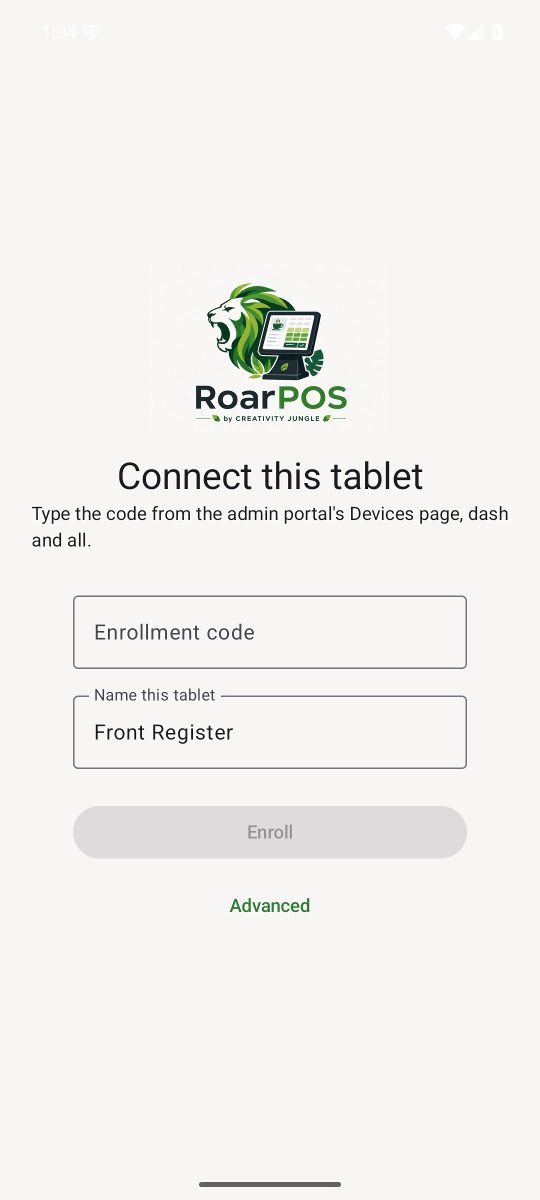
Installing on the tablet
- Open the downloaded file. Android asks once whether to allow installs from this source; allow it.
- Open RoarPOS. It shows Connect this tablet.
- In the owner portal, open Devices, choose the location and press Generate enrollment code.
- Type the whole code, dash and all, name the tablet, and press Enroll.
- Sign in with a staff PIN set on the portal's Employees page. If nobody has one yet the app says so and offers to check again.
Already installed?
The app tells you when a newer version is available and updates itself from Settings. There is no need to come back here for a new build unless a tablet is being set up for the first time.
RoarPOS
The point of sale built for coffee. Part of the HGCS ecosystem by Creativity Jungle.