
The register app
A native Android register that connects with one code, sells when the internet does not, and keeps itself current.
Android 8.0 or newer. Not in the Play Store; installed from this file.
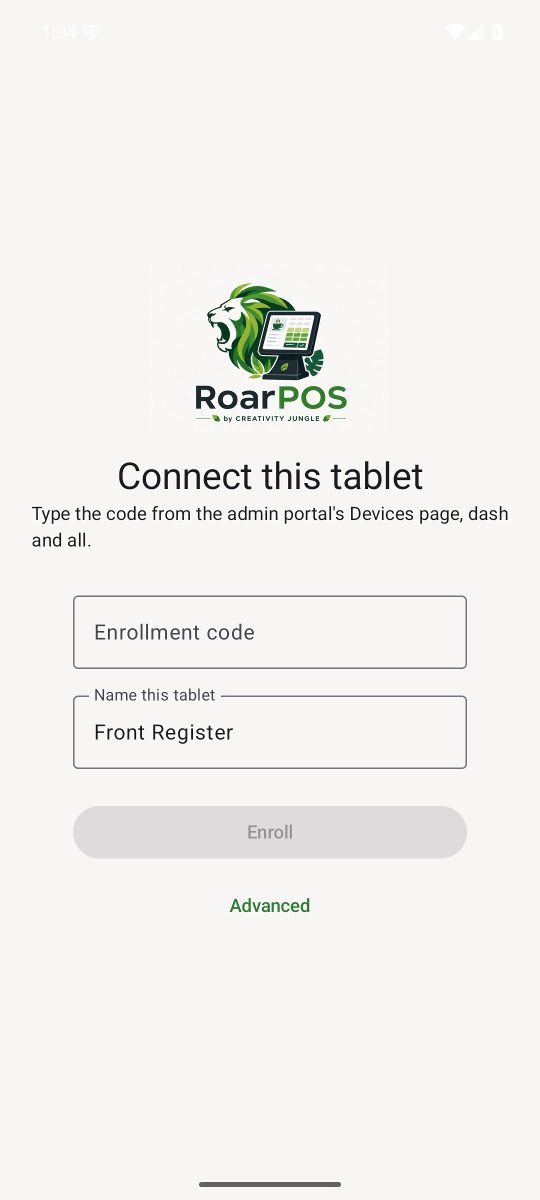
Connecting a tablet
Three steps, none of them technical.
1. Install
Download the APK on the tablet and open it. Android asks once to allow installs from this source.
2. Get a code
In the owner portal, open Devices, choose the location, and press Generate enrollment code. The code carries the cafe's name, like BREW-ABCD2345.
3. Type it
Open the app, type the code, give the tablet a name such as Front Register, and press Enroll. It finds the cafe from the code. No server address, no login.
Built for a counter
- PIN sign-in per staff member, checked on the tablet, so a dropped connection never locks anyone out
- Cash, card and invoice tenders; tips; discounts; loyalty lookup by phone
- Card payments pushed to the paired WisePOS E; the customer taps, the till waits
- Refunds and voids by permission, a cash drawer screen, and a running count of unsent sales
- The menu refreshes every minute and can be refreshed on demand from Settings
Kept up to date without a store
The register checks for a newer version after it opens and every few hours. When one exists, a banner says so with what has changed; Later hides it until the next version. Settings has Check for updates and Update now, which downloads the new build, verifies it against the published checksum and hands it to Android's installer. Nobody is forced to update unless a breaking change ever requires it.
RoarPOS
The point of sale built for coffee. Part of the HGCS ecosystem by Creativity Jungle.